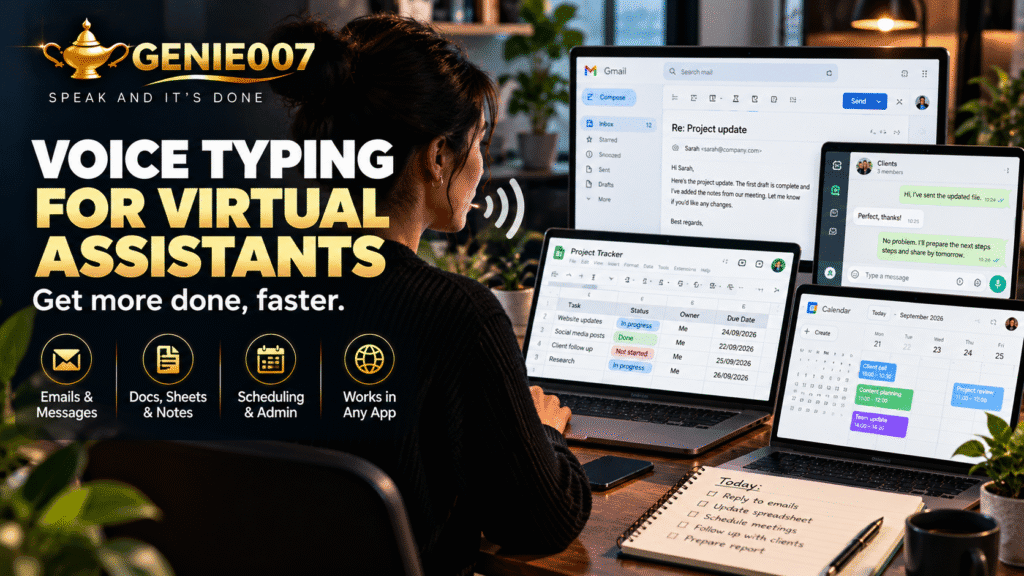
Voice typing for virtual assistants means speaking your emails, notes, and captions instead of typing them word by word. We speak at 120–150 words per minute but type at just 40–50. For VAs handling dozens of communications daily, switching to voice cuts most writing tasks by roughly 60 per cent and recovers hours every week.
The Writing Burden Most VAs Overlook
Research from Clockify on time spent on recurring tasks confirms what most VAs already feel: written communication takes up a disproportionate chunk of every working day. For a virtual assistant managing four or five clients, that can mean 25 to 40 individual pieces of written output before lunch — client emails, social captions, support replies, meeting notes, and report drafts.
At a typing speed of 40 to 50 words per minute, a 200-word client email takes four to five minutes to write. Twenty emails a day means 80 to 100 minutes of pure typing — before a word of editing. That is nearly two hours spent on input alone, before you have touched the higher-value work your clients actually pay for.
A Day in the Life: Before and After Voice Typing
Before voice typing, a typical morning might start with 45 minutes of email drafting, ten minutes reshaping a caption that somehow lost its tone between your head and the keyboard, and another stretch copying text between tabs. By 11am you have produced around 600 words of written output and your task list has barely shortened.
After voice typing, those same 600 words take under 15 minutes. You speak naturally, the text appears, and you spend under a minute checking for errors. The quality holds. The physical effort drops by two-thirds. Whether you work from a fixed desk or switch constantly between devices, Genie 007 on mobile keeps the same workflow in your pocket.
Five VA Workflows That Work Better With Voice
Here are the tasks where voice typing delivers the biggest gains for VAs, with example voice commands you can use immediately.
1. Drafting Client Emails
Open your email client, activate voice typing, and speak: “Confirm the Thursday 2pm meeting with Sarah, mention we will send the agenda the night before, keep it brief and professional.” A complete, well-structured email appears in under 30 seconds — ready to review and send, without a single keystroke in the body text.
2. Writing Social Media Captions
Caption writing is one of the most repetitive tasks in VA work. With voice typing enabled in any text field, you can dictate five captions in the time it once took to write one. Speak the brief for each post, review the output, and move on. Refinements are faster too: say “make that more conversational” and rework in seconds rather than retyping from scratch.
3. Capturing Meeting Notes
After a client call, dictate your key decisions and action points directly into Notion, Google Docs, or whatever platform your client uses. Voice typing captures at speaking speed with automatic punctuation applied. For VAs whose role includes regular meeting support, the detailed workflow is covered in our guide to dictating meeting notes.
4. Replying to Support Tickets
If your VA role includes customer-facing support, voice typing cuts reply time sharply. Speak the intent: “Apologise for the delay, confirm the team is investigating, ask for the order number, keep the tone warm but concise.” A professional, empathetic reply drafts itself while you are already thinking about the next ticket in the queue.
5. Building First-Draft Reports and Proposals
Reports and proposals involve gathering your thoughts before committing them to the page — so you are already thinking out loud. Voice typing lets you speak those thoughts as they form, producing a usable first draft at speaking speed. Editing comes afterwards and takes far less time than starting from a blank screen. For VAs who produce written content for clients, the same technique applies equally to blog posts, scripts, and briefing documents.
The Time-Savings Maths
VAs typically type at 40 to 50 words per minute. Speaking at 120 to 150 wpm gives a speed ratio of roughly 3:1. Here is how that translates across common daily tasks:
| Task | Typed (45 wpm avg) | Dictated (130 wpm avg) |
|---|---|---|
| 200-word client email | ~4–5 min | ~1.5 min |
| 500-word weekly report | ~11 min | ~4 min |
| 5 social captions (100 words each) | ~11 min | ~4 min |
| 20 support ticket replies (80 words each) | ~36 min | ~12 min |
Across a full working week, that compounds to 30 to 60 minutes recovered every day — without changing what you deliver. Improved VA productivity at this level has a direct commercial impact: more clients managed, faster turnaround times, and less time spent in the evenings catching up. Voice typing has become one of the most practical virtual assistant tools available precisely because the gains are immediate and the setup takes minutes. Genie 007’s plans start at £5 per month — see the pricing page for the full breakdown.
Addressing the Common Objections
Most VAs raise three concerns before committing to voice typing as a daily tool. All three are worth addressing honestly.
Is voice typing accurate enough for professional work?
Modern built-in options — Apple Dictation, Google Docs Voice Typing, and Windows Voice Access — achieve 93 to 97 per cent accuracy in quiet conditions. For a 200-word email, that typically means two or three minor corrections at most. A quality microphone pushes accuracy higher still. The correction time adds seconds, not minutes, and tends to disappear entirely with consistent daily use over the first week.
What about client confidentiality?
This is the objection that matters most for VAs working in legal, financial, or healthcare sectors. Built-in tools vary: some process audio in the cloud, others on-device. Genie 007 encrypts your audio in transit, processes it in real time and stores no recordings and no transcripts. It is GDPR compliant, covering the majority of client confidentiality requirements a professional VA is likely to encounter.
How long does it take to build a comfortable workflow?
Most VAs report feeling comfortable within two or three sessions of consistent practice. The core adjustment is learning to speak in complete thoughts rather than stopping and restarting mid-sentence — that click moment typically arrives within a day. Practise first on lower-stakes tasks such as internal notes and draft captions before moving to client-facing communication, and the transition becomes straightforward.
When Dictation Is Not Enough: Introducing Genie Mode
Standard dictation for virtual assistants solves the speed problem admirably. But it still requires you to compose each sentence in real time — the cognitive effort of writing remains even after the physical effort of typing is gone. For a VA managing communication across multiple clients, different brand voices, and several platforms simultaneously, that mental load is still substantial.
Genie 007’s Genie Mode takes a different approach. Rather than transcribing every word you speak, it executes your intent. You describe what the communication needs to do:
“Reply to the client about the project delay. Keep it professional, acknowledge the inconvenience, and reassure them we’re back on track by Friday.”
Genie 007 generates a complete, polished email — platform-aware and human-sounding — without you composing a single sentence. Change context to Slack and the same intent produces a more conversational message. Move to a formal proposal and the tone adjusts accordingly. This is what think-to-text means in practice: your intent becomes polished output, bypassing the sentence-construction step entirely.
Freelancers navigating similar communication volumes will recognise the same pressures — the voice typing for freelancers guide covers workflows that translate directly into VA practice. The underlying principle is the same: stop typing every word, start directing the outcome.
Try Genie 007 Free
Genie 007 gives virtual assistants two tools in one: fast, accurate voice typing for everyday dictation, and Genie Mode for when you need a complete, polished piece of communication without composing every word yourself.
Download Genie 007 free — available for Windows, Mac, mobile and as a browser extension. No credit card required.
Written by Bill Kiani, founder of Genie 007.
Frequently Asked Questions
What software do virtual assistants use for dictation?
Virtual assistants most commonly use built-in options such as Apple Dictation, Google Docs Voice Typing, and Windows Voice Access for basic dictation. For AI-powered dictation that goes further — executing intent rather than just transcribing words — Genie 007 is built for VA workflows including email drafting, social captions, and support replies.
Is voice typing faster than typing for a virtual assistant?
Yes — significantly. The average professional types at 40–50 words per minute, while speaking runs at 120–150 wpm. That is a 3:1 speed ratio on raw input. For a VA drafting a 200-word client email, voice typing cuts the task from four to five minutes down to around 90 seconds, with minimal correction time afterwards.
Can voice typing be used safely for confidential client work?
It depends on the tool. Built-in options from Apple, Google, and Microsoft vary in how they handle audio data. Genie 007 encrypts your audio in transit, processes it in real time and stores no recordings and no transcripts. It is GDPR compliant, making it suitable for sensitive VA work.
Related reading: voice typing for legal assistants — faster intake notes and client emails.