The best dictation software for writers turns spoken words into clean, publishable prose — not a raw transcript you have to rewrite by hand. It runs continuously through long thinking pauses, punctuates automatically, and works inside Scrivener, Word, or Google Docs, so you can draft a full chapter, or even a full book, by voice.
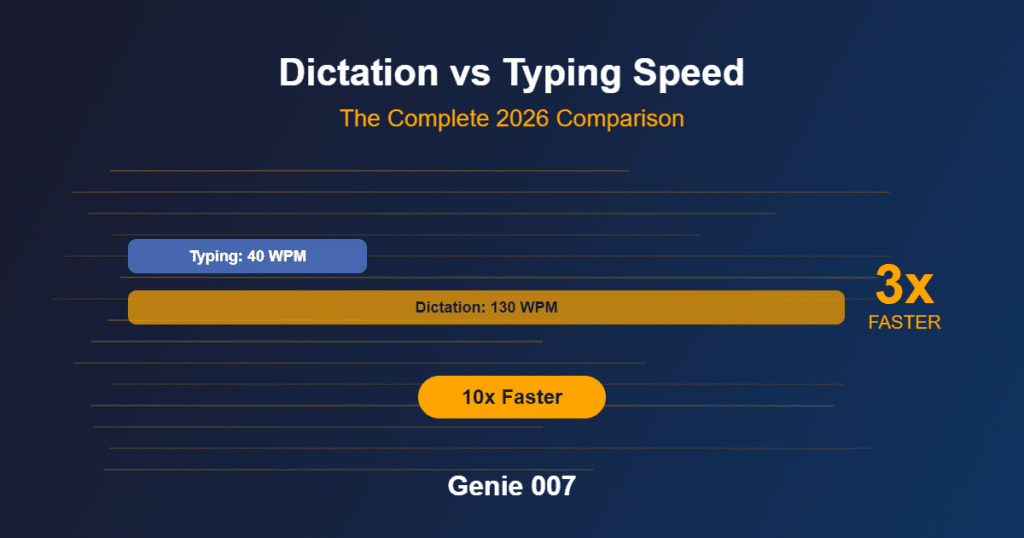
Typing tops out around 40–60 words per minute for most people. Natural speech runs at 130–150 words per minute — a three-to-four-times gap that widens further once you factor in the fumbled backspaces, autocorrect fights, and stiff sentences that typing invites. For anyone whose job is producing words — novelists, ghostwriters, bloggers, non-fiction authors — that gap sitting unused on the desk is the single biggest productivity lever available.
But dictation for writers isn’t the same problem as dictation for a quick text message. Fiction and long-form non-fiction demand continuous sessions that don’t time out mid-paragraph, punctuation that respects rhythm and dialogue instead of flattening it, and software that follows you into whatever app you actually draft in — Scrivener, Ulysses, Word, Google Docs, or a plain text file. This guide compares the best dictation apps for writers in 2026 and walks through a real workflow for dictating an entire book, chapter by chapter, with the word-count math to back it up. You’ll sometimes see this searched as speech to text software for writers, but the label undersells what modern tools actually do — the best ones format, punctuate, and preserve your voice automatically, rather than handing back a raw transcript.
What Writers Need from Dictation Software for Writers
Writers’ dictation needs differ from business users, developers, or casual users in several important ways, and it’s worth being specific about them before comparing tools.
Continuous dictation without timeouts. Most dictation tools are built for short bursts — a sentence, a search query, a text reply — and stop listening after a few seconds of silence. For writers, that’s unusable. Creative writing involves long pauses to think, silences while you formulate the next sentence, and sessions that run 30 minutes or more without a natural stopping point.
Clean prose output, not literal transcription. When a business user dictates a meeting note, accuracy means getting the facts right. When a writer dictates a scene, accuracy means preserving rhythm, word choice, and intentional stylistic risk-taking. Speech recognition software for writers has to handle metaphor, unusual sentence structure, invented character names, and deliberate fragments without “correcting” them into generic phrasing.
Punctuation intelligence. Saying “comma, period, new paragraph” out loud destroys creative flow. The best tools place punctuation from natural speech pauses and intonation, so you speak the way you’d talk to a friend and get properly formatted prose back.
Application compatibility. Writers work in Scrivener, Google Docs, Microsoft Word, Ulysses, iA Writer, Obsidian, Bear, and plain text editors. A tool locked to one app forces you to change how you write. System-wide dictation — one tool that works everywhere text can be typed — is close to essential.
The Best Dictation Apps for Writers in 2026
Not all dictation apps for writers are built the same, and the differences matter more once you’re relying on the tool daily rather than testing it once.
Genie 007 — best overall. Genie 007 combines continuous dictation without timeouts, AI-driven punctuation, and system-wide compatibility across every writing app, with local, on-device processing for manuscript privacy. The AI understands context rather than just converting sound to text — it preserves your word choices in creative prose, handles unusual vocabulary and proper nouns, and places punctuation from your natural speech pattern rather than verbal commands. For fiction writers, that means dictating dialogue and description in a natural speaking voice without stopping to think about formatting. For non-fiction authors and bloggers, it means cleaner first drafts that need less editing. It’s free to start, works on Windows, Mac, mobile, and as a browser extension, and processes audio on-device — your manuscript never touches an external server. 140+ language support also means bilingual writers can switch language mid-paragraph without changing a setting.
Dragon Professional — best for full voice control. Dragon has been a go-to dictation software for writers for two decades, and its accuracy after voice training is genuinely excellent. Its edge is a full voice command system — “go to end of paragraph,” “select previous sentence” — useful for writers who want to keep their hands off the keyboard entirely, including those with RSI. The trade-offs in 2026: $500–$700, a dated interface, 20–30 minutes of upfront voice training, and only 6 supported languages. Strong if you already have a trained profile; hard to justify for a new user against free alternatives that match its accuracy.
Google Docs Voice Typing — honest free built-in. Free, no install, works immediately inside Google Docs. It’s a genuinely fine starting point for writers who draft exclusively in Docs and want to try dictation before committing to anything else. The limits show up fast for serious use: it only works inside Google Docs in Chrome, needs an internet connection because audio is processed on Google’s servers, and stops listening after a few seconds of silence — exactly when a writer is mid-thought. Not recommended as your only tool once you’re writing daily.
Windows and Mac built-in dictation — honest free built-in. Windows (Win+H) and macOS (double-press Fn) both ship dictation with zero setup. Genuinely useful as a five-minute test to see whether dictation suits your process at all. Both need an internet connection, both struggle with extended sessions, and punctuation handling is basic — fine for a note, not for a chapter.
If you want the wider field — including tools built for editing after dictation rather than writing-specific workflows — our best dictation software 2026 roundup covers 15 tools across every use case.
Which one is right for you depends on what you’re actually writing. A novelist drafting scenes needs the tool that preserves rhythm and handles character names without flattening them — that rules out the free built-ins for anything beyond a short scene. A non-fiction author working from research notes cares more about handling technical terms and citations cleanly. A blogger publishing daily cares most about speed from thought to published paragraph. Match the tool to the writing you actually do most, not the one with the flashiest feature list.
Best Dictation App for Writing a Book: A Full Chapter-by-Chapter Workflow
The question writers actually want answered isn’t “which tool is fastest” — it’s “what’s the best app to dictate a book, start to finish, without the output turning into a mess I have to rebuild from scratch.” Here’s a workflow that works for fiction and non-fiction alike.
Step 1 — Outline the chapter before you speak. Five to ten minutes with three to six bullet points: the beats you need to hit, a piece of dialogue you want to land, a fact or figure to reference. You’re not scripting the chapter, just giving your dictation session a spine so you don’t lose the thread mid-sentence.
Step 2 — Dictate the full chapter without stopping to correct. This is the single habit that separates writers who succeed with dictation software for writing a book from those who give up on day two. Speak the whole chapter, typos and all, and resist the urge to fix a misheard word mid-flow — stopping to correct breaks your creative momentum far more than a wrong word costs you later. Dedicated dictation software for writers handles long, uninterrupted sessions without cutting you off, which is exactly what a chapter-length dictation needs.
Step 3 — Run the word-count math. At a natural speaking pace of 130–150 words per minute, 5,000 words is only 33–38 minutes of continuous talking. In practice, with the thinking pauses every writer needs, output lands closer to 90–120 words per minute — which puts a 5,000-word chapter at roughly 40–55 minutes of actual dictation time, comfortably split across one or two sessions in a day.
| Daily word-count goal | Realistic dictation time | Focused editing pass | Total session length |
|---|---|---|---|
| 2,000 words | 15–20 minutes | 20–30 minutes | Under 1 hour |
| 3,500 words | 25–35 minutes | 35–45 minutes | About 1–1.25 hours |
| 5,000 words | 40–55 minutes | 45–75 minutes | Under 2.5 hours |
| 8,000 words | 65–90 minutes | 75–120 minutes | Around 3–3.5 hours |
Step 4 — Edit as a separate pass. Once the chapter is down, read it back once (hearing it exposes weak phrasing faster than reading silently), then run a focused editing pass: fix misheard names, tighten transitions, cut anything that repeats itself. This is where a keyboard is still faster than voice — moving paragraphs and adjusting structure are precision tasks. Budget roughly as much editing time as dictation time for a first pass; it shrinks fast once the chapter’s structure is right.
Step 5 — Repeat, and let the pace compound. A writer dictating one 5,000-word chapter a day, five days a week, is drafting a 90,000-word novel in roughly eighteen writing days — before a single editing pass. That’s the case for dictation software for writing a book over typing it: not that any one session is dramatically shorter, but that the sessions stack without the hand fatigue that makes an 8,000-word day physically punishing to type.
How to Use Dictation Software for Writers Effectively
Dictation is a skill, not a switch you flip. The first session or two will probably feel halting — that’s normal, since you’ve spent years training yourself to compose at typing speed, and retraining to compose at speaking speed takes a week or two of regular practice.
Start with non-precious writing. Don’t dictate your novel’s climactic scene on day one. Warm up on emails, journal entries, or a scene you don’t mind getting wrong, so you can develop your rhythm without the pressure of your best work riding on it.
Speak in complete thoughts. The most common mistake is composing word-by-word, the way you type. Formulate the full sentence in your head, then say the whole thing — it produces more natural prose and gives the AI better context for punctuation and word choice.
Don’t edit while dictating. When you hear an error, resist stopping to fix it immediately — that’s a separate phase. Dictate the full session, then switch to editing mode and clean up in one pass.
Walk while you dictate, if you can. Many writers find gentle movement — pacing a room, walking outside — measurably improves their dictated output. The physical movement engages a different part of the brain than sitting at a desk, and the combination tends to produce more fluid, natural prose.
Dictation vs Typing Speed: The Numbers Behind Dictation for Writers
The case for dictation for writers isn’t a hunch — it’s measurable. A 2025 multi-country study measuring typed versus voice-dictated documentation across 72 accents recorded a median dictation speed of 93 words per minute against a median typing speed of 21.5 words per minute — a 4.3x advantage for voice, even before accounting for the fact most professional typists in that sample were far from expert (medRxiv, 2025). Even taking a more conservative view — average adult typing at 40–50 words per minute against natural speech at 130–150 — the gap still runs 3x to 4x, and it widens further with technical or descriptive vocabulary, which slows typing more than it slows speech.
For book-length projects, that gap compounds. Most professional novelists aim for 1,000–2,000 words a day; with dictation, that goal is achievable in 15–30 minutes of actual talking time, leaving the rest of the writing session for editing, research, and planning. Some dictation-focused authors — including Kevin J. Anderson and Terry Goodkind, who have both written extensively about dictating fiction — report sustaining 5,000–10,000 words a day by combining multiple dictation sessions with dedicated editing breaks.
Privacy Considerations When Using Dictation Software for Writers
If you’re dictating unpublished fiction, the content of your dictation is your unpublished manuscript — plot twists, character arcs, and ideas you haven’t shared publicly. That’s worth protecting deliberately, not as an afterthought.
Cloud-based dictation tools — Google Voice Typing, Windows and Mac built-in dictation among them — send your audio to remote servers for processing. These companies generally don’t claim ownership of your content, but your spoken words do travel across the internet and get processed on infrastructure you don’t control. For published authors under embargo, ghostwriters handling client manuscripts, or journalists on sensitive stories, that’s a meaningful risk rather than a theoretical one.
Local-processing tools — Genie 007 among them — handle audio entirely on your device. Nothing is transmitted, recorded, or stored externally, which is the only architecture that offers genuine privacy for a manuscript you haven’t published yet.
Frequently Asked Questions About Dictation Software for Writers
What’s the best dictation app for writing a book?
Genie 007 is the strongest all-round choice for writing a book by voice: continuous dictation with no timeouts, AI punctuation that preserves creative phrasing, and system-wide compatibility with Scrivener, Word, and Google Docs. Dragon Professional is the alternative if you want full voice control of your computer, not just text entry.
Can dictation software for writers handle a full novel manuscript?
Yes. Modern dictation software for writers is built for continuous, long-form sessions rather than short commands, so a 90,000-word novel is a realistic project — dictated chapter by chapter, with a separate editing pass after each session rather than during it.
How many words can you realistically dictate in a day?
At a natural speaking pace with normal thinking pauses, most writers produce 4,000–6,000 words in an hour of active dictation, and some dictation-focused authors sustain 5,000–10,000 words a day across multiple sessions plus editing breaks.
What’s the best free dictation software for writers?
Genie 007 is free to start with no credit card required, and works across Windows, Mac, mobile, and browser. Google Docs Voice Typing and the built-in dictation on Windows and macOS are also free but are limited to short sessions and a single app or ecosystem.
Will dictating change my writing style as an author?
Often, and most writers who dictate regularly consider it a benefit. Dictated prose tends to be more natural and conversational than typed prose, because the slow mechanics of typing encourage over-thinking each word, while speaking flows closer to how you’d tell the story out loud.
Start Writing Faster
Dictation is the single biggest productivity multiplier available to writers — not a replacement for your keyboard, but a faster input method for the phases of writing where speed and flow matter most. Draft chapters by voice, edit and polish by keyboard, and watch a daily word count that used to take hours shrink to a session you can finish before lunch.
For related workflows, see how to write blog posts by voice, how to turn rough voice notes into text you can actually publish, and a full walkthrough on how to get better at dictation in your first week.
Try Genie 007 Free
Draft your next chapter by voice, not by hand — Genie 007 handles the punctuation and formatting so you can stay in the story.
Download Genie 007 free — available for Windows, Mac, mobile and as a browser extension. No credit card required. View pricing and plans.
Writing marketing copy rather than manuscripts? Our guide to voice typing for marketers covers dictating briefs, ad copy and captions by voice.
Written by Bill Kiani, founder of Genie 007.
Authors who publish on their own site can also dictate directly into Gutenberg — see our guide to WordPress voice typing.