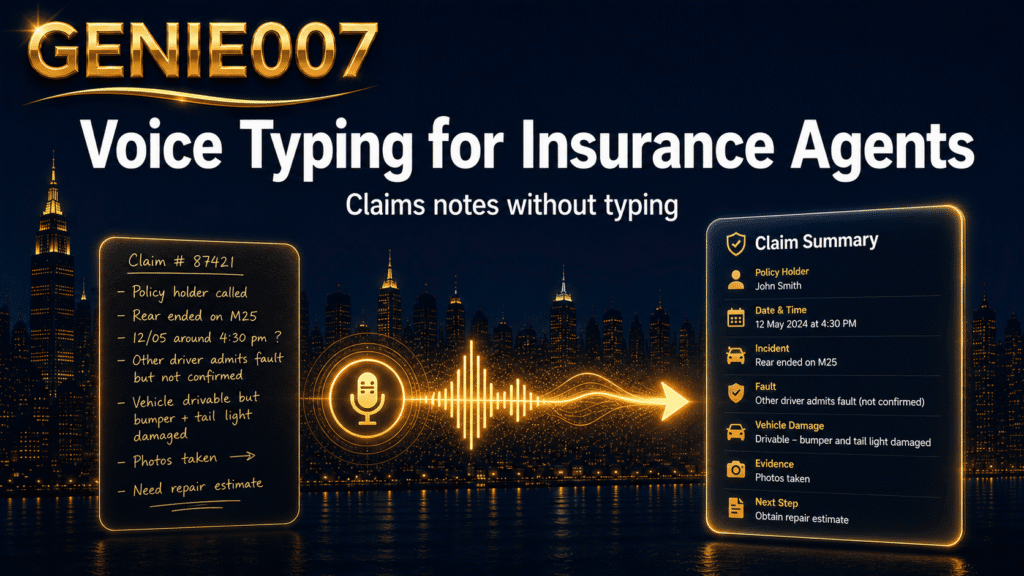
If you are an insurance agent, the paperwork never really ends. Policy updates, claims notes, client meeting summaries, renewal letters — documentation swallows hours that could go to clients and new business. Dictation for insurance agents is the most practical way to reclaim those hours: speak your notes and they appear on screen three times faster than typing, with no “comma” commands, no manual formatting, and no late evenings at the keyboard.
The Documentation Burden Eating Into Your Working Day
Every agent knows the feeling: a productive morning with clients, then the rest of the day spent catching up on everything that should have been written in real time. Research published by VanillaSoft indicates that insurance agents typically spend up to 40% of their working day on administrative tasks — and for field agents handling site visits, that figure can climb considerably higher. Documentation is not a peripheral inconvenience; it is a structural drain baked into the job.
The paperwork list is relentless: first notice of loss reports, coverage confirmation letters, policy amendment notes, compliance records, client call logs, and follow-up emails. Each item alone takes only a few minutes to type. Stack a dozen of them across a working day, though, and you lose two or more hours to low-value keyboarding — time that a licensed, experienced agent could spend on revenue-generating activity instead.
That time cost compounds. An agent spending three hours a day on documentation is effectively working a second job as a data-entry clerk. The same output, produced by voice, takes roughly one hour. That is the gap that dictation closes.
A Day in the Life — Before and After Voice Typing
Consider a claims agent visiting a property after a flood report. She photographs the damage, speaks with the homeowner, and compiles her assessment mentally. Back at her desk, she spends 45 minutes converting those mental notes into a written report — often from imperfect memory, because there was no time to write during the visit. The next client’s file is already waiting.
Now consider the same visit with voice typing. On the drive back, she dictates her report aloud — describing the damage, the homeowner’s account, the preliminary assessment — while the detail is still fresh. By the time she parks, a draft sits on her phone, ready for a quick read-through before submission. The 45-minute typing session has become a 10-minute review.
That shift — from catching up at a desk to capturing thoughts in real time — is what dictation for insurance agents makes possible. Field-based professionals in particular find the gain substantial; our dedicated guide to dictation software for insurance adjusters covers the on-site workflow in greater depth.
Five Workflows Where Dictation for Insurance Agents Pays Off
Insurance documentation is not a single task — it is many. Here are the five areas where agents consistently report saving the most time through voice typing.
1. Claims notes after a site visit
Field agents spend significant time documenting damage assessments, witness statements, and site conditions after every visit. Dictating on site or immediately afterwards keeps detail accurate and eliminates the memory-gap errors that creep in after several hours at a desk.
Example command: “Roof damage covering approximately 40% of surface area, predominantly south-facing slope. Customer reports water ingress since Saturday’s storm. Visible ceiling staining in the master bedroom. Flag for specialist assessment.”
2. Policy amendment and endorsement notes
When a client calls to change their coverage mid-term, agents need to record the request, the reason, and any acknowledgements made during the call. Rather than typing whilst trying to listen, dictate a concise summary immediately after the call ends — before the next task lands.
Example: “Client requested removal of accidental damage cover from home policy, effective next renewal. Advised of resulting premium reduction. Written confirmation from client required before processing.”
3. Client meeting follow-ups
Post-meeting emails and CRM updates frequently take longer than the meeting itself. Dictating the key points straight after a client visit — whilst details are still fresh — means nothing is forgotten, and the summary lands in the inbox the same day rather than being deferred to the end of the week.
4. Renewal letters and routine outreach
Standard renewal letters follow a repeatable structure that lends itself to dictation. Instead of typing from scratch or copy-pasting with manual edits, agents can dictate a personalised draft in under two minutes. Agents who adopt this approach consistently report cutting the time spent on routine correspondence by more than half.
5. Compliance records and audit trails
Regulatory requirements demand thorough documentation of advice given, disclosures made, and decisions taken. The problem is that detailed record-keeping requires time — and under deadline pressure, notes get abbreviated or deferred. Dictation makes it practical to keep records complete because capturing them by voice is fast enough to do in the moment, not something to put off until the pile becomes unavoidable.
The Time-Savings Maths
If each of the five workflows above saves a conservative 15 minutes a day, that is 75 minutes reclaimed every working day. Across a standard five-day week, that is more than six hours. Over a full working year — roughly 48 weeks — the total approaches 300 hours of time recovered from administrative keyboarding.
For an agent on a £35,000 salary, those hours represent approximately £5,000 in recovered productive capacity. For a senior producer billing at a higher rate, or for a team of five agents each making the same gains, the numbers become considerably more significant. Even a more modest saving of 20 minutes per day, sustained consistently, moves the needle on both output and wellbeing.
The wider picture matters too. According to the 2026 Big “I” Agents Council for Technology Tech Trends Report, two-thirds of independent insurance agencies now plan to increase their technology use in the next 12 months — with operational efficiency cited as the primary motivation. Dictation is one of the highest-return investments in insurance agent productivity that requires no firm-wide initiative to implement, just the willingness to speak instead of type.
Beyond Basic Dictation — Where Think-to-Text Changes the Game
Standard voice typing — including the options built into Windows and macOS — converts speech to text reliably in quiet conditions. The real ceiling appears when you consider what these tools cannot do: they transcribe words faithfully, but they do not think about the document you are trying to produce.
Dictating a client meeting note still requires you to dictate every sentence in sequence, structure your paragraphs, and say exactly what you want written. That is faster than typing, but it leaves the composition work entirely with you.
Genie 007’s think-to-text approach goes a step further. Instead of transcribing your words verbatim, it understands your intent. You speak the raw thoughts — “visited the site this morning, damage is to the front two rooms, mainly ceiling and one window, report to the underwriter and note we may need a specialist” — and it produces a polished, professionally structured assessment note, ready to paste directly into your agency management system.
No dictating every clause. No reformatting the output afterwards. Just a finished document in seconds, written in your voice.
For agents with client confidentiality obligations, Genie 007 is also HIPAA ready — content is processed in-browser with no audio stored and no client data sent to external servers. Your client details stay private by design, not just by policy. You can review plan options on the Genie 007 pricing page.
Frequently Asked Questions
Is voice dictation accurate enough for insurance terminology?
Modern AI dictation handles specialist vocabulary well, including terms such as “subrogation”, “indemnification”, “excess of loss”, and policy-type identifiers. Accuracy depends on the quality of the tool and how clearly you speak, but most agents find they need fewer corrections than expected after a short adjustment period. For everyday insurance language in a reasonably quiet environment, accuracy is not typically a barrier to adoption.
Can I use voice typing inside my agency management system?
Yes, provided the tool operates at system level rather than only inside a specific browser. Genie 007 works inside any application — browser-based or desktop — including most agency management systems. You dictate directly into the field where the text needs to go, with no switching between windows or copy-pasting required.
How do I ensure client data stays private when using dictation software?
Data handling varies significantly between tools. Some products send audio to cloud servers for processing; others process locally or in-browser with no data leaving the device. For insurance agents handling sensitive personal and financial information, verifying a tool’s data handling policy before adoption is essential. Genie 007 processes content in-browser, stores no audio, and retains no client data — a practical fit for agents who operate under confidentiality and regulatory obligations.
Try Genie 007 Free
If you have been losing hours each week to documentation, voice typing is the most immediate fix available — and Genie 007’s think-to-text approach takes it further, turning your spoken thoughts into polished, structured insurance notes without dictating every word.
Download Genie 007 free — available for Windows, Mac, mobile and as a browser extension. No credit card required.
Written by Bill Kiani, founder of Genie 007.