If you work across two languages every day—writing emails in English, then Slack messages in Spanish, then back to a report in French—your fingers aren’t the only thing exhausted. Your brain is — and the right dictation software for bilingual professionals removes that mental tax entirely.
The mental cost is real. Code-switching, the cognitive shuffle of moving between languages, consumes working memory even for fluent speakers. Each language swap—deciding which language to use next, retrieving vocabulary, adjusting grammar—creates cognitive load. For bilingual staff in customer service, international teams, or multicultural workplaces, this happens dozens of times a day. One customer-service manager reported spending an hour each morning typing replies in two languages; the context-switching left her drained before lunch.
But the real drain isn’t the typing speed. It’s the decision tax. When you’re typing, you’re conscious of every word. When you speak, you’re expressing thought directly—no mental filter between intent and output. For bilingual professionals, dictation software for bilingual professionals that understands code-switching solves this in one move: remove the friction, keep the fluency.
The Bilingual Professional’s Day: Before and After
Meet Sofia, a customer-success manager for a UK fintech firm with a growing Spanish and Portuguese-speaking user base. Her day looks like this:
Before dictation: Sofia spends 8:30–9:30 a.m. typing replies. A customer complaint comes in Portuguese; she composes a thoughtful response, translating mentally as she types. Each sentence takes 45 seconds: think, type, backspace, retype. She shifts to an English escalation for a UK client (30 seconds—easier, native speaker). Back to Spanish for a setup question (90 seconds—she’s less fluent, so she double-checks grammar). By 9:30, she’s answered four emails and feels mentally wrung out. Her accuracy suffers; she’ll catch mistakes only on the third read.
After voice typing with live translation: Sofia hits record. “Portuguese: o cliente relata que o login não funciona, e precisa urgently de ajuda hoje.” The software transcribes and translates to English. Total time: 20 seconds, no typos, natural phrasing. She shifts to English email (15 seconds), then Spanish, at half the mental cost because she’s speaking, not filtering. Same four emails answered by 9:15. She feels fresh. Her tone is warmer in each message because she wasn’t scrambling for words.
That’s not a marginal gain. That’s 15 minutes of reclaimed focus and a shift from exhausted to energised before 10 a.m.
Three Workflows That Solve Real Bilingual Pain
Workflow 1: Live Translation for Customer Communication
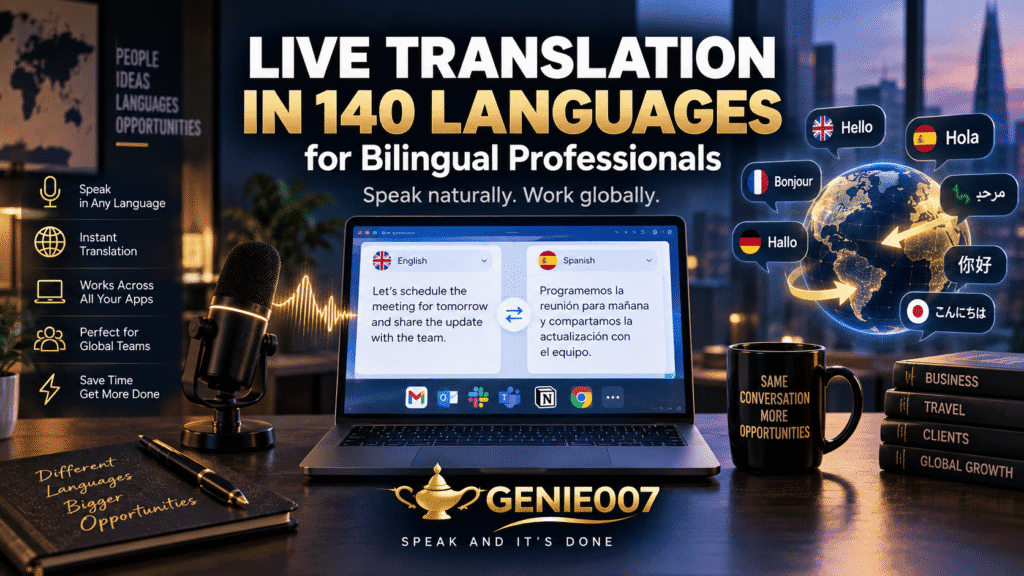
You’re drafting a reply in your second language, and you know it sounds stiff. With Genie 007, you speak your intent in your native language, and the software outputs polished text in the target language—automatically.
Voice command: “Spanish: tell this client that we’ve escalated their issue and they’ll hear back by end of day.”
Output in Spanish: “Hemos escalado su caso y recibirá respuesta antes del final del día.” (Polished, professional, sounds native.)
No copy-paste loops to a translation tool. No typing the result back in. You’re speaking once; output is ready to send. The software understands context (professional tone for customer support, casual for team Slack) and adapts tone automatically.
Workflow 2: Fast Context-Switching in Meetings and Chat
A Slack thread has switched languages mid-conversation. One team member asks in German, another replies in English, and now you need to add clarity in both. Typing forces you to consciously compose. Speaking is instant.
Voice command: “English: tell the team the deadline is Friday, then German: and the designer needs asset files by Wednesday.”
Two messages, one voice input, 10 seconds. No mental tax. No re-reading to check if your German article agreement is correct (the software handles that).
Workflow 3: Email Drafts That Sound Like You in Any Language
Most bilingual professionals have one “safe” language for written communication and avoid the other unless forced. Dictation flips that. Because you’re speaking, your natural style emerges in both languages.
Voice command: “French: I’m following up on our conversation last week about the partnership proposal. I’d love to hear your thoughts by Friday.”
Output: Naturally-worded French that sounds like your native voice, not a stilted translation. The software learns your writing patterns and applies them across languages.
The Mental Maths: Where the Time Goes
Here’s what actually happens when you type across two languages:
- Typing speed for native language: 60–80 words per minute (wpm)
- Typing speed for second language: 30–50 wpm (slower because you’re thinking)
- Code-switching overhead: 5–10 seconds per switch (decision, context load, context retrieval)
- Editing cycles: two passes minimum (read for grammar, read for tone)
A 200-word customer email in your second language, typed: roughly 5 minutes (250 words per 5 minutes, plus two editing passes). Same email, voice dictated with live translation: 90 seconds (no editing cycle because accuracy is higher, and you’re speaking at natural pace). That’s 3.5 minutes saved per email. For 10 emails a day, that’s 35 minutes. Over a month, 150 minutes—nearly three hours of reclaimed focus time.
That compounds. You’re not spending cognitive energy on language mechanics; you’re spending it on the customer problem itself. Empathy, problem-solving, relationship-building—the things customers actually remember.
Objections: Accuracy, Privacy, and Learning Curve
Accuracy: “Will it understand my accent?”
Older transcription tools were trained on native speakers only. Modern AI like Genie 007 handles 140+ accents and language variations, including regional dialects and non-native speakers—British accents, Indian English, Latin American Spanish, and Québécois French with 95%+ accuracy. You’ll catch the rare error on first read; you won’t cycle through two full edit passes like you do when typing.
Privacy: “Is my second-language communication stored?”
For professionals handling client data or confidential work in multiple languages, this matters. Cloud-based dictation uploads audio to remote servers. Genie 007 processes on-device. Your conversations stay private—GDPR compliant, HIPAA-ready, AES-256 encrypted, zero data retention. This is a significant advantage for legal teams, healthcare professionals, or anyone handling sensitive multilingual communication.
Learning curve: “How long before I’m comfortable?”
Most bilingual professionals report comfort within 2–3 sessions. The awkward part is speaking in a professional context, not the software. You’ll feel self-conscious for a week, then realise your output is better and faster. Users reach 95% natural pace by day three and full fluency by day five.
Why Plain Speech-to-Text Falls Short
Google Docs Voice Typing is free, and it works for single-language users. But if you code-switch, it treats each language like a separate session. You say something in Spanish, then English, and the software can’t infer intent across the boundary. You’ll end up editing transcripts like you’re correcting typing. Think-to-text technology is different—it doesn’t transcribe words; it interprets meaning. You say “I need this urgently,” and it outputs coherent text that captures your intent, even if you stumbled over a word or code-switched mid-sentence. For bilingual professionals, that distinction is everything.
Frequently Asked Questions
Is there dictation software that works in two languages?
Genie 007 supports 140+ languages and live translation. You can speak in one language and get output in another, or code-switch mid-sentence and the software will handle both. Built-in tools (Windows Voice Access, Apple Dictation, Google Docs Voice Typing) don’t handle live translation or code-switching; they’ll transcribe both languages but won’t translate or adapt context.
How can bilingual workers type faster in their second language?
Stop typing, start speaking. Dictation removes the grammar-checking bottleneck that slows second-language typing. Most bilingual professionals achieve 50–70% faster output in their second language when using voice instead of keyboard—because they’re speaking at native pace, and the software handles grammar automatically. Multilingual voice typing for global teams is specifically designed for this.
What is code-switching fatigue and how can I avoid it?
Code-switching is the mental load of moving between languages throughout the day. It’s cumulative—by end of day, even fluent speakers feel exhausted. Fatigue is driven by decision-making (which language to use, retrieving vocabulary) and the cognitive overhead of filtering thought through a second language while typing. Dictation reduces fatigue because speaking is less effortful than typing; you’re expressing thought directly without the filter. Fewer switches also help—batching same-language work (answering all Spanish emails first, then English) reduces switching costs.
Do voice typing tools work for non-native speakers?
Yes. Dictation is actually easier for non-native speakers because it removes the typing bottleneck. When you speak, you’re at your natural pace and accent. When you type in a second language, you’re also correcting grammar consciously, which slows you down to 50% of speaking pace. Dictation software trained on diverse accents (like Genie 007) adapts to your accent and outputs correct text automatically. The result: second-language writers sound more native and professional than they would when typing.
Set Up Dictation for Bilingual Work
Genie 007 is available on Windows, Mac, mobile, and as a browser extension. Start with the platform you use most: if you draft emails in Gmail, use the browser extension; if you live in Slack or Teams, install the extension or mobile app. Activate live translation in settings and select your two primary languages. Then speak as you normally would—the software learns your style and adapts.
For teams, pricing starts at £5/month for individuals and £8 per user per month for teams (minimum 3 seats). That’s about a third the cost of some competitors and comes with full multilingual support, live translation, and on-device privacy.
Try Genie 007 Free
Bilingual professionals working in customer support, international teams, or multicultural environments spend hundreds of hours a year typing across two languages. Dictation software with live translation cuts that to half—and keeps your accuracy and tone high while doing it. Speak in your native language, output polished text in another, and recover your focus for the work that matters.
Download Genie 007 free — available for Windows, Mac, mobile and as a browser extension. No credit card required.
Written by Bill Kiani, founder of Genie 007.
More language guides: voice typing for translators and Tagalog voice to text.