The Scenario: A Voice Note in Another Language
Your aunt sends you a two-minute voice note in Mandarin. Your colleague shares feedback on a project in Spanish. A friend forwards a voice message in French. Whether it lands on WhatsApp, Telegram or as an iPhone voice memo, learning how to translate voice message to English content quickly matters — and every manual method you know takes three separate steps.
This is the core frustration with translate voice message to english workflows: they demand manual work, context-switching, and time. The conventional path is transcribe, then translate, then compose a reply. By the time you’ve done that, you’ve lost momentum and attention.
For Arabic voice notes specifically, our arabic to english voice translator guide breaks down accuracy across MSA, Egyptian, Gulf, and Levantine speech.
Why Standard Transcription and Translation Fall Short
Apple’s built-in voice dictation can transcribe your own spoken input with fair accuracy, and the iPhone’s Translate app handles text and voice beautifully — but it was designed for learning languages, not for translating incoming voice messages from others. The friction comes when a voice note arrives: you must copy the audio file, load it into a transcription tool, export the text, then paste it into a separate translator. Each step introduces delay and breaks focus.
The typical manual workflow looks like this: download the voice file from WhatsApp or Telegram, open Google Translate or Microsoft Edge Translator, paste the audio (if supported), wait for transcription to finish, then run translation on the result. If transcription quality is poor — particularly with accents, background noise, or rapid speech — you might need to replay the audio, correct the transcript by hand, and re-run translation. What should take seconds now takes minutes.
Google Docs’ voice typing works well for your own dictation in one language, but transcribing someone else’s voice message requires downloading it first. Microsoft’s Copilot and Edge Translator cover text and some video, yet they do not natively handle incoming audio files from messaging apps without manual export and conversion steps. The Apple iPhone Translate app is excellent for learning, but processing incoming audio messages requires exporting the file out of your messaging app and opening a separate application entirely.
The real limit: these tools treat transcription and translation as separate problems. You solve them in isolation, in different apps, with copy-paste joins between each. That workflow is precise but slow — and it assumes perfect transcription in a foreign language before translation even begins. Accents, background noise, and dialect variation often degrade transcription quality, which cascades into mistranslation. A phrase misheard as a different word in the original language will translate incorrectly, and you may not realise the error until the translation appears on screen. By then, context is lost.
The Genie 007 Live Translation Workflow: One Step, One Result
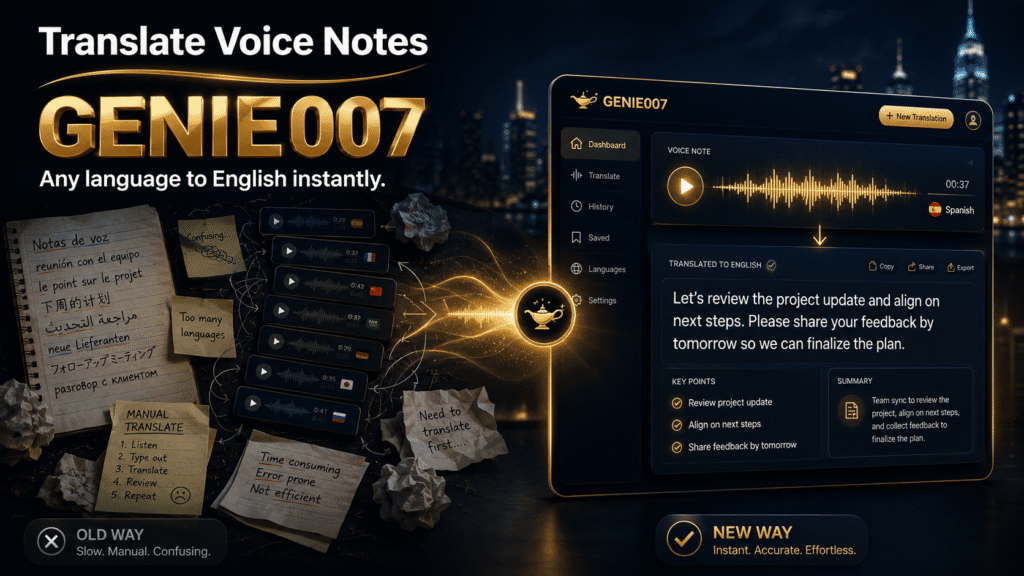
Genie 007 solves this with live translation: transcribe and translate simultaneously in a single voice interaction. Here’s how it works in practice.
Scenario 1: A voice message in your inbox. A colleague sends a voice message in Portuguese. You open Genie 007 (available on mobile, browser extension, Windows, and Mac), enable live translation to English, and play the incoming audio file in the app or through the Genie 007 interface. As the voice message plays, Genie 007 transcribes it and translates it to English simultaneously. You read the English text in real time, understand the full context, and draft your response by voice in English — Genie 007 handles the composition and tone.
Scenario 2: A voice note from WhatsApp or Telegram. A relative sends a voice note in Mandarin over WhatsApp. You download or forward the audio, open Genie 007’s mobile app, select live translation to English, and process the voice note. Because Genie 007 understands 140+ languages with accent awareness, it captures the meaning even if the speaker’s tone is casual, rapid, or mixed with English words. You get polished, translated English text — not a literal word-for-word transcript.
Scenario 3: Drafting a reply by voice. Once you’ve understood the incoming message, you respond by voice in English. Genie 007 uses think-to-text to compose your reply: speak your thoughts naturally, and it generates a complete, contextually appropriate message ready to send back to the original sender — all without dictating word-by-word.
The entire workflow — inbound transcription and translation, understanding, outbound composition — happens in one tool, without copy-paste loops, without switching apps, without manual export steps.
Accuracy and Nuance in Live Translation
A critical question: does simultaneous transcription and translation preserve meaning? The answer depends on language pair complexity and Genie 007’s architecture.
For direct language pairs with high training data (English—Spanish, English—Mandarin, English—French), live translation captures intent accurately. Genie 007’s multilingual models understand context, idiom, and tone within 140+ languages, so casual speech (“Yeah, that’s brilliant”) translates to the colloquial equivalent, not a stiff literal rendering. The difference matters when someone speaks naturally rather than reading from a script: a friend’s warmth, a colleague’s urgency, or a relative’s humour come through the translation, not just the bare words.
The reason simultaneous translation works is that Genie 007 does not transcribe first and translate second in sequence. Instead, it processes the audio in context, understanding the speaker’s intent, accent, and regional dialect from the start. This reduces transcription errors that would cascade into mistranslation. If a Spanish speaker says “está genial” (it’s great), Genie 007 translates the meaning and tone (“That’s brilliant”), not a word-by-word “it is great”.
For less common language pairs or heavily accented speech, live translation may simplify nuance — a trade-off worth noting. If a voice message contains wordplay, cultural references, or highly technical terminology (medical terms, legal jargon, engineering specs), you may want to ask the sender for clarification in text, or use live translation as a first pass and follow up with confirmation. This is the honest limitation of any automated translation, not unique to Genie 007. Machine translation at scale will never capture every cultural layer of human speech.
In practice, live translation succeeds because you can follow up in seconds: if a detail seems off, ask. The speed of understanding and responding in real time outweighs the small risk of minor misinterpretation. For family voice notes, casual check-ins from friends, and most professional messages, this trade-off is easily worth it. You understand 95% of meaning instantly and can clarify the remaining 5% in a follow-up message.
Privacy: Your Conversations Stay Private
One concern when processing voice messages through any AI tool is: who sees this? With Genie 007, your data stays yours. Genie 007 encrypts your audio in transit, processes it in real time and stores no recordings and no transcripts. This is particularly important when translating sensitive voice messages from family, colleagues, or clients. Genie 007 encrypts your audio in transit, processes it in real time and stores no recordings and no transcripts.
Getting Started: Translate Voice Messages to English in Three Steps
Step 1: Download Genie 007. Install from genie007.com. The app is available for Windows, Mac, mobile, and as a browser extension. No credit card required. The free trial works across all four platforms, so you can test live translation on the device you use most — phone, computer, or browser. If you want to upgrade after the trial, view the pricing options.
Step 2: Enable live translation. Open settings, select your source language (or leave it on auto-detect if the incoming messages vary), and set the output language to English. Save. You can also adjust granularity: if you only receive voice messages in one language, lock that source; if messages come in multiple languages, use auto-detect to recognise the language and translate it in real time. Both modes work seamlessly.
Step 3: Process incoming voice messages. When a voice note arrives, open it in Genie 007, tap the translate button, and listen as the transcription and English translation appear on screen. You’ll see the original language transcribed on the left, English translation on the right, both updating in real time as the audio plays. Respond by voice, and let Genie 007 compose your reply. Your response is ready to copy and send back through WhatsApp, Telegram, email, or any other app. The entire flow — listening, understanding, composing, sending — now takes under a minute instead of five to ten.
FAQ: Common Questions on Voice Message Translation
Can you translate a voice message on WhatsApp? Not directly within WhatsApp itself, but you can download the voice message, open it in Genie 007, enable live translation to English, and get instant transcription and translation. Genie 007 encrypts your audio in transit, processes it in real time and stores no recordings and no transcripts. Once you’ve read and understood the message, you can reply directly in WhatsApp using Genie 007’s voice-reply feature within the messaging app.
How do I translate a voice note to text? Load the voice note file into Genie 007, select your source language (or use auto-detect), enable live translation to English, and the app will transcribe and translate simultaneously. You’ll see English text appear in real time as the audio plays. This is faster and more accurate than transcribing to the original language first and translating second, because context and tone are preserved from the start.
What’s the best free way to translate voice messages? Apple’s built-in Translate app handles text voice translation on iPhone at no cost, and Google Translate is free on any browser — but both require manual transcription first. Genie 007 offers a free trial with no credit card, allowing you to test live voice translation across 140+ languages before deciding whether to upgrade. If you need a permanently free option, Google’s free tools cover the basics; if you want speed and accuracy, a paid voice translation tool like Genie 007 saves time and reduces errors.
How do I translate Telegram voice messages? Telegram does not have a built-in translation feature for voice messages. Download the voice file from Telegram, open Genie 007, select live translation to English, and process the audio. Genie 007 will transcribe and translate the message, and you can then compose your reply in Telegram using Genie 007’s voice input within the app, ensuring consistency across platforms.
Can I translate voice messages on iPhone? Yes. Use Apple’s Translate app for text translation, or download Genie 007 for iPhone to handle voice message translation directly from incoming audio files. Genie 007’s mobile app supports live translation in 140+ languages with better accuracy for accents and casual speech than Apple Dictation alone.
Try Genie 007 Free
Voice messages in other languages no longer require a complex transcribe-then-translate workflow. With live translation, you understand and respond in seconds, all from one app — and your conversations stay private.
Download Genie 007 free — available for Windows, Mac, mobile and as a browser extension. No credit card required.
Written by Bill Kiani, founder of Genie 007.
For the reverse direction — speaking Spanish and getting typed English straight into an email — read our guide to the spanish to english voice translator workflow.
Related reading: voice typing for translators — speak your translations instead of typing them.
Once you’ve translated an incoming voice note, you can dictate your reply the same way, read how WhatsApp voice typing works on desktop.