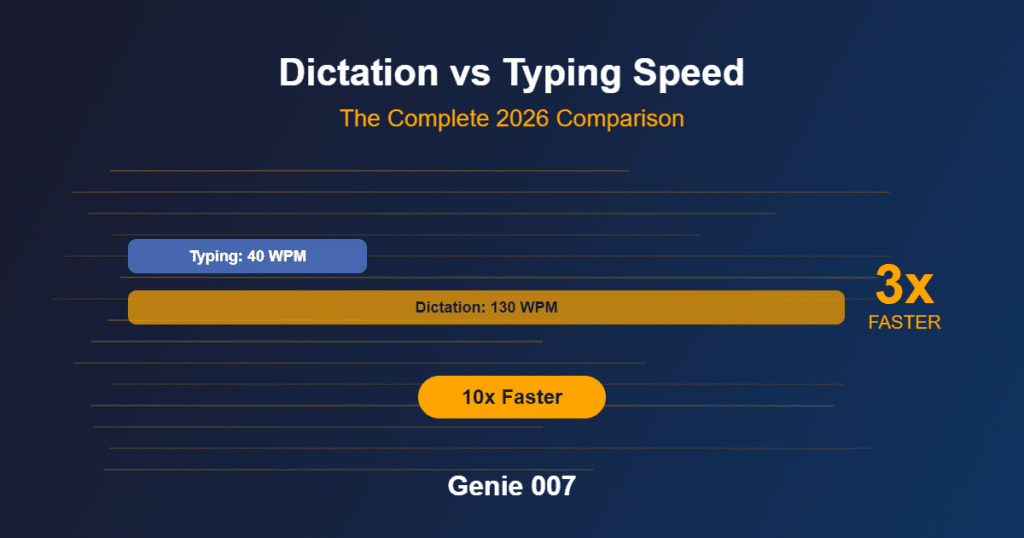
Freelance translators face a frustrating paradox: you bill by the word, but your output is capped by how fast you can type. Most people speak at 140–160 words per minute, yet average typing speed hovers around 60–80 wpm. For a translator handling 2,000–5,000 words daily, that gap costs hours every week. Voice typing for translators solves this by letting you draft translations at speaking speed, then refine them in a single pass — turning a 3-hour typing job into 90 minutes of dictation plus light editing.
Beyond raw speed, repetitive strain injury (RSI) plagues the translation profession. Wrist, neck, and shoulder pain from sustained keyboard work is a widely reported occupational hazard among professional translators, and bodies such as the Translators Association highlight it as an ongoing concern for the profession. Adding voice typing to your workflow isn’t just a productivity play — it’s injury prevention. This guide walks you through the workflows, objections, and real setup.
Why Translators Are Stuck With the Typing Bottleneck
Translation isn’t assembly-line work. You read the source text, hold context in your mind, think through multiple phrasings, then type the target language — all while managing terminology databases, CAT tool interfaces, and client style guides. The cognitive load is high, but the physical load — fingers striking keys 3,000–5,000 times per day — is relentless.
Traditional typing workflows amplify the strain. You switch between mouse (source text pane, client docs, terminology lookup) and keyboard (target text entry), often with poor ergonomics in a home office. CAT tools like SDL Trados and memoQ were designed in an era before voice became a production tool; their voice input options are bolted-on afterthoughts, requiring cumbersome voice macros or heavy post-editing of transcripts.
The economic incentive makes it worse. If you’re paid £0.05–£0.15 per word (typical rates for European language pairs), your income is fixed per word regardless of hours worked. Faster typing doesn’t mean higher pay — it means more words, more strain, and burnout sooner. Voice typing reframes this: you’re not trading health for speed; you’re maintaining speed while protecting your hands.
Before and After: A Translator’s Day Reimagined
The Old Way (Typing-Only): You log in at 9 am with a 2,500-word marketing document to translate into German. You open your CAT tool, load the glossary, and begin typing the target language. At 1 pm, you’re halfway through, wrists aching, eyes strained from switching between panes. You take a break, ice your wrists, return at 2 pm. By 5 pm you’ve finished and spent 6 hours at the keyboard. You invoice for 2,500 words at £0.08 per word = £200 for a day of pain.
The New Way (Voice + Edit): You load the same 2,500-word document and open Genie 007 voice typing on your Windows or Mac. You read the source sentence aloud in English, speak the German translation into your microphone, and Genie 007 delivers polished, punctuated German text into your CAT tool. You do a light read-through, fix terminology that needs it, and move on. By 1 pm you’re finished — 3.5 hours of dictation (speaking is faster when you’re not also typing) plus 30 minutes of editing. Same invoice (£200), but you’ve worked less than half the day and your hands aren’t sore.
Five Real Workflows for Voice Typing for Translators
Workflow 1: First-Pass Dictation Open your CAT tool and activate Genie 007 (browser extension or desktop app). Read the source segment aloud, speak the translation, and let Genie 007 auto-punctuate and format it. This cuts keystroke volume substantially for marketing or technical copy. You’ll edit for quality, but you’re no longer fighting the keyboard.
Workflow 2: Cross-Language Voice Typing If you’re translating from your native language into English (or vice versa), Genie 007’s live translation feature shines. Speak in your native language and get polished output in the target language. A French translator dictating into English can work at native speaking speed while Genie 007 handles the English output, learning your terminology over time.
Workflow 3: Terminology Database Entry Building your client’s terminology database doesn’t require typing each pair. Dictate them: “Spanish, client portal; target, portal del cliente.” Genie 007 formats consistently. Updating a 500-term glossary drops from 45 minutes to 20 minutes of dictation plus a quick review.
Workflow 4: Admin and Email Dictation Outside translation, voice typing handles emails, invoices, and project notes. You can dictate status updates and payment terms without touching the keyboard, freeing up energy for translation work itself.
The Time and Health Math
Let’s quantify the gain. Assume you’re a full-time translator working 5 days a week, 4,000 words per day on average.
Typing Only: 4,000 words ÷ 70 wpm (realistic for sustained translation work) = 57 minutes of pure keystroke time, plus 50% overhead for thinking, pausing, and CAT tool navigation = 85 minutes of focused desk time daily. Over 5 days, that’s 7+ hours of intensive hand/wrist strain weekly.
Voice Typing Plus Editing: 4,000 words spoken at 140 wpm (speaking is faster than typing for translation because you’re not typing) = 29 minutes of dictation. Add 30 minutes for editing and refinement. Total: 59 minutes of focused work, but your hands are resting during the dictation phase. Weekly hand strain drops to under 5 hours, and you finish your work 2–3 hours sooner.
For freelancers, that’s not just comfort — it’s capacity. You can take on additional work in the time you free up, without increasing hours or pain. Or you can work fewer hours, protect your long-term career health, and maintain the same income.
Addressing Translator Objections
Objection 1: “Won’t the voice output be crude? Translation needs precision.” Genie 007 isn’t basic speech-to-text. It’s think-to-text: it understands context, learns your terminology and writing style, and delivers polished output the first time. You’re not transcribing; you’re composing. For a translator, this means you speak the target phrasing (not dictating word-by-word), and Genie 007 handles punctuation, formatting, and phrasing automatically. Your editing time is genuinely light, not a second full translation pass.
Objection 2: “Will it handle terminology and abbreviations?” Yes. Genie 007 learns your personal glossary and client terminology over time. You can also feed it domain-specific language (legal, medical, technical) so it recognises and transcribes specialist terms correctly. Unlike generic dictation tools that stumble on “CAT tool” or “EUR 2,500”, Genie 007 captures your terminology accurately after you’ve used it a few times.
Objection 3: “What about privacy? My clients have confidentiality agreements.” Genie 007 processes everything in-browser or on-device. Your audio never touches Genie 007’s servers. Encryption is AES-256. No logging, no retention. It’s GDPR compliant and HIPAA ready — you can dictate client content with confidence. This is a genuine advantage over cloud-based dictation tools that store audio on remote servers.
Objection 4: “Won’t I need to learn a new interface?” Genie 007 works inside your existing workflow — your CAT tool, your email client, your documentation platform. There’s no context switching. You activate it, dictate into your normal pane, and keep working. Most translators are up to speed within a single session; the learning curve is measured in minutes, not days.
Getting Started: Platform Setup for Translators
Genie 007 is available on Windows, Mac, mobile, and as a browser extension, so you can use it wherever you work. If your CAT tool runs in your browser or you spend time in cloud-based tools (Google Docs, Microsoft 365, web-based clients), the browser extension is ideal. For desktop CAT tools (Trados, memoQ), the Windows or Mac app gives you consistent access across your entire workflow.
Once installed, spend 30 minutes training Genie 007 on your terminology. Dictate a few sentences in your target languages and let it learn your accent, pacing, and phrasing style. Upload or paste your client glossaries (if using Genie 007’s Premium plan for terminology databases). Then start with a small job — perhaps 500 words — and time yourself. You’ll see the productivity bump immediately.
Why Voice Typing for Translators Matters Now
The translation industry is changing. Clients expect faster turnaround times, CAT tools are becoming more cloud-native, and remote work has normalised flexible setups. But RSI rates among translators haven’t fallen — they’ve risen as workloads intensify. Voice typing for translators isn’t a luxury; it’s occupational health protection.
Unlike generic speech-to-text (which requires heavy post-editing and works poorly in domain languages), think-to-text technology like Genie 007 is built for knowledge work: professionals who compose ideas, not transcribe audio. For translators, that distinction is crucial. You’re not recording a dictation that someone types later; you’re composing your translation at speaking speed and letting AI handle the transcription. The cognitive load stays high (as it should), but the physical strain drops dramatically.
Start with understanding think-to-text and how it differs from basic dictation. Then explore multilingual voice typing for the 140+ languages Genie 007 supports — whether you’re translating into German, Spanish, Mandarin, or a lesser-spoken pair, the tool works the same way.
FAQ: Voice Typing for Translators
Can voice typing help with translator productivity? Yes, significantly. Most translators speak 70–100% faster than they type. Switching to voice dictation with a light editing pass can cut your daily keystroke time by half or more, depending on how accustomed you are to speaking your drafts aloud. The productivity gain is both speed and reduced physical strain.
Is speech-to-text good for translation work? Traditional speech-to-text (basic transcription) is poor for translation because it treats your words as a verbatim record. Think-to-text, by contrast, understands context and intent. Genie 007 learns your terminology, your accent, and your writing style, so it delivers polished output that requires only light editing for nuance and terminology fit. That’s why it works for professional translation where basic dictation fails.
How can translators reduce carpal tunnel and RSI? Ergonomic improvements (desk setup, breaks, stretching) help, but the biggest relief comes from reducing keystroke volume. Voice typing cuts daily keyboard time considerably for most translators. Combined with ergonomic changes and breaks, it’s the most effective preventative. If you’re already experiencing pain, consult a healthcare professional and consider resources on voice typing for carpal tunnel and RSI relief.
Try Genie 007 Free
Stop letting typing speed limit your translation output. Dictate first-pass translations at speaking speed and edit for polish — protecting your hands and reclaiming hours every week.
Download Genie 007 free — available for Windows, Mac, mobile and as a browser extension. No credit card required.
Written by Bill Kiani, founder of Genie 007.